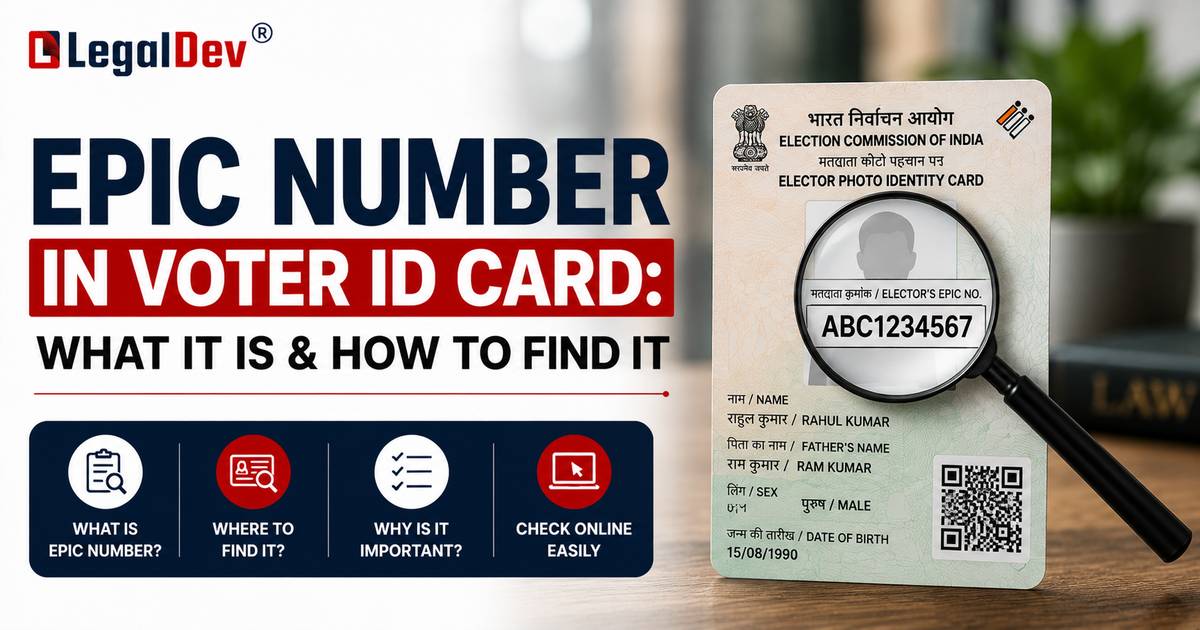
What Is EPIC Number in Voter ID Card And Where Do You Find It?
A lot of people have their Voter ID card but have no idea what the EPIC number even is. Which is fine — until the ECI portal asks for it and suddenly you're stuck.
This guide sorts that out completely.
So What Exactly Is the EPIC Number?
EPIC stands for Election Photo Identity Card. The number itself — the EPIC number in your Voter ID card — is that 10-digit alphanumeric code the Election Commission assigns to every registered voter in India.
Think of it like your voter identity's PIN. It doesn't change, it's unique to you, and the ECI uses it to locate your record in the electoral roll instantly.
What does it look like? Something along the lines of NUO1234561 — three letters, seven digits, always ten characters total.
Without this number, most things on the NVSP portal just won't work. Searching your name in the voter list, downloading your e-EPIC, correcting your details via Form 8 — all of it needs the EPIC number at some point.
Where Is It on Your Physical Voter ID Card?
Front side. That's where it lives on every format of the card.
Where exactly on the front depends on which card you have:
The old laminated version — it's usually printed near the top, somewhere above or beside your photo. Hard to miss once you know you're looking for a 10-character code.
The PVC smart card (the newer one) — it sits within the personal details section, neatly laid out.
The e-EPIC PDF — open the file, it's right there on page one near your name.
Honestly, if you have your physical card right now, the EPIC number search ends here. Five seconds.
How to Find EPIC Number in Voter ID Online
No card around? The NVSP portal has you covered — this is the official route the Election Commission provides.
Step 1 — Open the National Voters' Service Portal and click on 'Search Your Name in Voter List'.
Step 2 — Two options come up: 'Search by Details' or 'Search by Mobile'. Pick whichever one you're more comfortable with.
Step 3 — Select your state, pick your preferred language from the dropdown, enter the required details and the captcha, then hit 'Search'.
Your EPIC number shows up in the results — right there in the 'EPIC Number' column, along with everything else the ECI has on file for you.
Takes maybe three minutes, start to finish.
How to Download Voter ID with EPIC Number
Got the EPIC number? Good. Here's how the e-EPIC download actually works:
Step 1 — Click 'Login' on the NVSP portal.
Step 2 — Put in your mobile number, password, and captcha. Hit 'Request OTP'.
Step 3 — Enter the OTP that lands on your phone. Click 'Verify & Login'.
Step 4 — Find the 'E-EPIC Download' tab on your dashboard and click it.
Step 5 — Choose 'EPIC No' or 'Form Reference No.' — whichever you have.
Step 6 — Type in your EPIC number or the Form Reference Number, select your state, click 'Search'. (The Form Reference Number is in the acknowledgement message you got after submitting Form 6 during registration.)
Step 7 — Your details will appear on screen. Now click 'Send OTP'. If that button isn't showing up — it means your mobile number isn't linked to your voter record. That's a separate fix, covered right below.
Step 8 — Enter the OTP, hit 'Verify'.
Step 9 — Click 'Download e-EPIC' and the PDF lands on your device.
EPIC Number Not Found? OTP Not Arriving? Read This
This is genuinely one of the most common complaints people have with the portal. Nine times out of ten, it's one of these four things:
Your details don't match exactly. The electoral roll is unforgiving about spelling. "Rahul" and "Rahool" are two different people as far as the database is concerned. Double-check your name, date of birth, and state — letter by letter if needed.
Your mobile number has changed. The OTP only goes to whichever number you registered with originally. If you've switched numbers since then, that's why it's not coming.
You need to file Form 8. This is the Correction of Entries form on the Voters' Service Portal. Filing it under the correction option lets you add or update your active mobile number. Once that processes, the OTP button reappears.
None of the above worked? Go to your Electoral Registration Officer's office in person. Manual verification takes a bit more time, but it's reliable and it bypasses all the portal issues.
What Can You Use the EPIC Number For?
Once you know your EPIC number in your Voter ID card, here's what it unlocks:
Searching your name in the NVSP voter list — the first thing most people need before any election. Downloading the e-EPIC, the digital version of your Voter ID. Tracking where your Voter ID application currently stands. Making corrections through Form 8 — name, address, photo, mobile number. Verifying your voter registration status whenever you need to.
That's a lot riding on a 10-character code. Worth knowing.
One Last Thing
If you registered recently and haven't received your physical card yet — don't wait for it. The e-EPIC is fully valid at polling booths. Download it, save it, maybe print one copy. The Election Commission has made it official.
And if the portal is giving you grief and elections are days away, the ERO office is your safest bet. Walk in, show some ID, and they'll sort it manually.
FAQs
Q: What does EPIC stand for on a Voter ID card?
A: EPIC is short for Election Photo Identity Card. So the EPIC number is simply the unique voter ID number — that 10-digit alphanumeric code — that the Election Commission of India prints on every Voter ID card. It's the code that identifies you in the electoral roll.
Q: How do I find my EPIC number if I lost my Voter ID card?
A: Head to the National Voters' Service Portal and use the 'Search Your Name in Voter List' section. Enter your name, date of birth, and state — or search using your registered mobile number. Your EPIC number shows up in the results, and you can download the e-EPIC PDF right after.
Q: Can I download e-EPIC without knowing my EPIC number?
A: Yes, if you registered via Form 6, you received an acknowledgement with a Form Reference Number. Use that number on the E-EPIC Download page — it works as an alternative to the EPIC number for fetching your voter ID.
Q: Why is the 'Send OTP' button missing on the e-EPIC page?
A: It usually means the mobile number on your voter record is outdated or unlinked. The fix is Form 8 — the Correction of Entries form on the Voters' Service Portal. Add your current mobile number there, wait for the update to process, and the OTP option will come back.
Q: What does an EPIC number actually look like?
A: It's always 10 characters — three letters followed by seven digits. Something like NUO1234561. The Election Commission of India assigns this format to every registered voter, and it never changes once issued.
Q: How do I check if my Voter ID card is ready after I applied?
A: Log into the NVSP portal and check the application status section using your Form 6 reference number or EPIC details. Once your application is processed, you can also download the e-EPIC directly from your account dashboard without waiting for the physical card.
Q: Is the EPIC number the same as the Voter ID number?
A: Yes, they're the same thing. The terms are used interchangeably across government portals and forms. Both refer to that 10-digit alphanumeric code on your Election Photo Identity Card.
Q: Can I vote without my physical Voter ID card if I have my EPIC number?
A: The e-EPIC — the digital PDF you download from the NVSP — is accepted as valid identification at polling booths. Keep a copy on your phone or print one before election day. That said, always check the ECI's latest guidelines before an election, since accepted documents can be updated.
Q: How do I update my address on Voter ID using the EPIC number?
A: Log into the NVSP, go to voter services, and submit Form 8 under 'Correction of Entries'. You'll need your EPIC number to pull up your record. Address changes usually reflect in the electoral roll within a few weeks of the update being approved.
Q: The EPIC number search on NVSP shows nothing — what now?
A: First, check that everything you entered matches your electoral roll record exactly — name spelling, date of birth format, and state. If it still shows nothing, your record may have a registration gap or a mismatch. At that point, visiting your Electoral Registration Officer in person is the most reliable way to get it resolved.